Technical Perspective
RaptorMCP Gateway: Technical Setup Brief
Deployment requirements for a Qlik MCP Gateway on Qlik Sense Enterprise on Windows (QSEoW, client-managed) and Qlik Cloud.
Technical Purpose
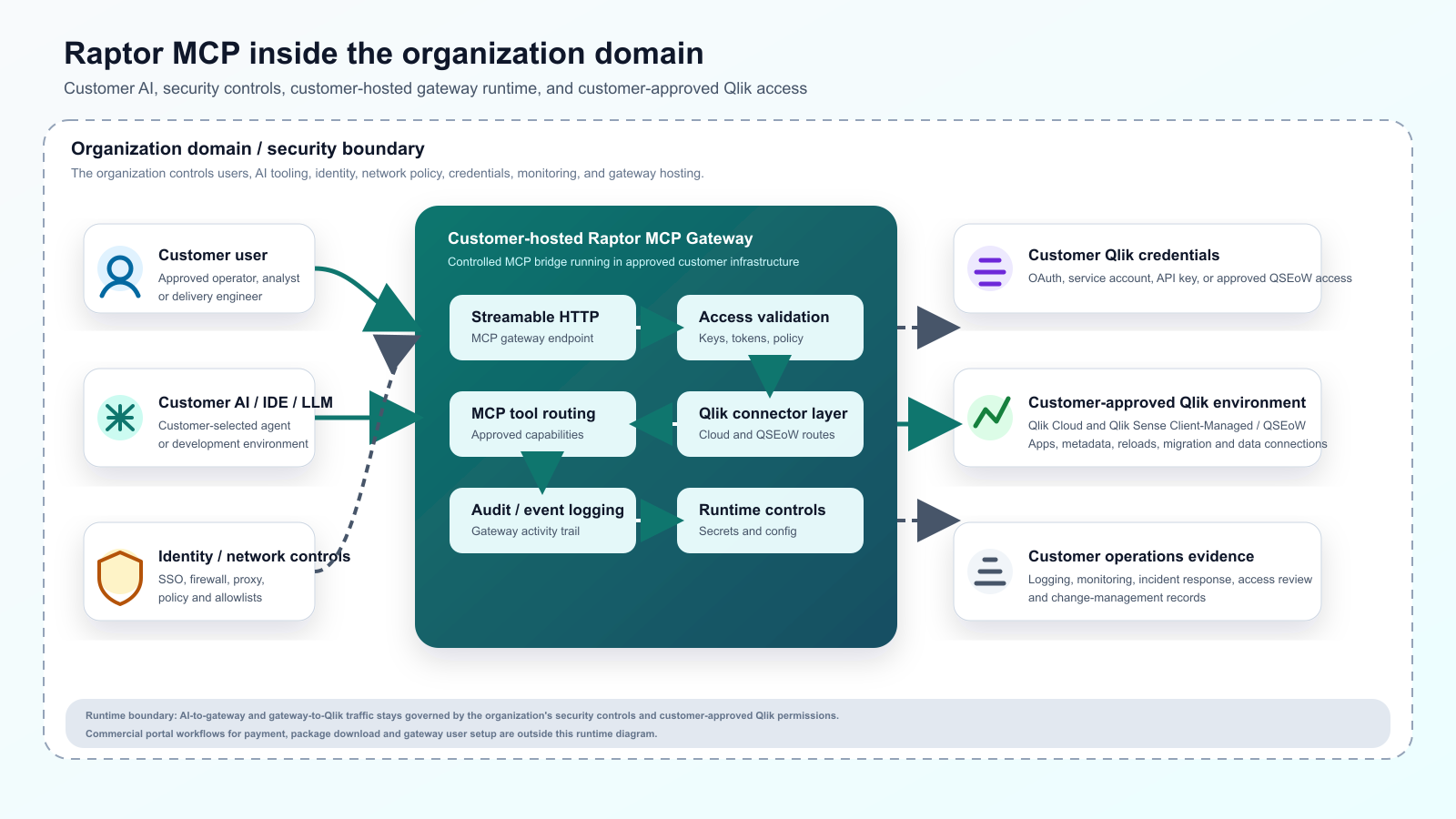
This brief outlines the technical requirements for deploying the RaptorMCP Gateway. For a QSEoW (client-managed, on-premises) environment, the Gateway should be installed on an approved internal server, VM or container host that can securely reach the relevant Qlik Sense services. For Qlik Cloud, the Gateway connects to the tenant's APIs and can be customer-hosted or Modern Management hosted. Hybrid estates can use both connections where configured.
The Gateway exposes a controlled MCP endpoint to approved AI agents and translates those governed requests into Qlik-related workflows using the access granted to the configured identity or assigned user.
The Gateway also serves the enterprise knowledge base, filtered by configured folder permissions, and keeps it under Git version control with LFS for larger assets. Where prompts and data are processed depends on the AI model, provider and configuration chosen; an internally hosted Gateway does not by itself make inference local.
High-Level Architecture
Approved AI client or internal middleware
- Connects to the RaptorMCP Gateway over the approved internal HTTPS route.
- Gateway validates access, entitlement, user assignment, and enabled workflow scope.
- Gateway connects to Qlik Sense Client-Managed APIs and Engine services.
- Qlik Sense returns app, script, object, reload, field, metadata, or operational information according to configured permissions.
Core Setup Requirements
| Area | Requirement |
|---|---|
| Hosting | Approved Windows Server, Linux VM, or container host capable of running the gateway service. |
| Runtime | Node.js service or approved container runtime, depending on the chosen deployment model. |
| Network | Gateway must reach the Qlik Sense central node and any relevant proxy, repository, and engine endpoints. |
| Inbound access | Only approved AI clients, internal middleware, admin tooling, and monitoring systems should reach the gateway. |
| Security | Customer-managed TLS, firewall rules, reverse proxy if required, logging, secret storage, and incident response controls. |
| Qlik authentication | Approved Qlik Sense authentication method, commonly certificate-based or service identity based depending on the customer's environment. |
| Access control | Gateway role and user assignment aligned to the customer's governance model and Qlik permissions. |
| Monitoring | Health checks, service logging, alerting, restart process, and backup of gateway configuration. |
| Optional SSE | Separate Qlik SSE/Python analytics component where forecasting, machine learning, NLP, or enrichment workflows are in scope. |
Qlik Sense Information To Confirm
- Qlik Sense version, patch level, and topology.
- Central node hostname, proxy configuration, and relevant virtual proxy details.
- QRS, Engine, and proxy endpoints the gateway is allowed to reach.
- Authentication approach, including certificate handling or approved service identity pattern.
- Required permissions for app inspection, script support, reload support, object inspection, and any administration workflows.
- Environment scope, such as development, test, production, or selected apps only.
- Whether advanced analytics via Qlik SSE/Python is required.
Network Paths
Inbound To Gateway
| Area | Requirement |
|---|---|
| Approved AI client or middleware | Gateway HTTPS endpoint for MCP requests. |
| Monitoring platform | Gateway health endpoint for service checks. |
| Admin workstation or deployment tooling | Controlled administration and deployment access where required. |
Outbound From Gateway
| Area | Requirement |
|---|---|
| Qlik Sense central node and relevant nodes | QRS, proxy, and Engine/API access. |
| Gateway license or entitlement service, if applicable | License validation and assigned capability checks. |
| Internal logging or monitoring systems | Operational logs, health events, and support evidence. |
| Optional SSE server | Advanced analytics workflows where SSE is in scope. |
SSE / Python Analytics Note
The RaptorMCP Gateway is the governed MCP access layer. It is separate from Qlik SSE. If the customer wants advanced analytics such as forecasting, machine learning, NLP, clustering, or external enrichment, a separate Qlik SSE/Python analytics service may also be required.
That SSE service is installed and managed as a Qlik Sense server-side extension, normally reachable only from the Qlik Engine nodes. It should have its own service monitoring, resource controls, firewall rules, and support process.
Implementation Decisions
- Where the gateway will be hosted and who will operate it.
- Which Qlik Sense apps, streams, or environments are initially in scope.
- Which users, groups, or AI clients are approved to connect.
- Which gateway modules and workflows are enabled.
- How Qlik certificates, tokens, and secrets will be stored and rotated.
- How logs, monitoring, backup, upgrades, and support handover will work.
Readiness Checklist
- Approved host or container environment available.
- Network route from gateway host to Qlik Sense confirmed.
- Qlik authentication and certificate approach agreed.
- Gateway endpoint exposure model approved by security.
- Initial user and client access model agreed.
- Monitoring and restart process defined.
- SSE requirement confirmed as in or out of scope.